 urbnywrt
AnyDesk Profile Generator and Parser (ID)


AnyDesk Profile Generator and Parser is a tool for automatically generating, analyzing, and managing AnyDesk profiles. The script allows you to create new profiles, find "beautiful" IDs, view configurations, and apply selected profiles in AnyDesk.
Note
: A Russian version of this README is available here.
Features
-
Generate AnyDesk Profiles:
- Create new profiles with unique IDs.
- Configure timeout for each profile generation.
-
Find "Beautiful" IDs:
- Repeating digits (e.g.,
55555). - Ascending (
1234) and descending (4321) sequences. - Palindromes (e.g.,
123321). - Special numbers:
228,1488,322.
- Repeating digits (e.g.,
-
View Configurations:
- View the contents of the
system.conffile by a specific ID.
- View the contents of the
-
Apply a Profile to AnyDesk:
- Copy the selected configuration to the user's AnyDesk folder.
- Launch AnyDesk with the new profile.
-
Highlight "Beautiful" IDs:
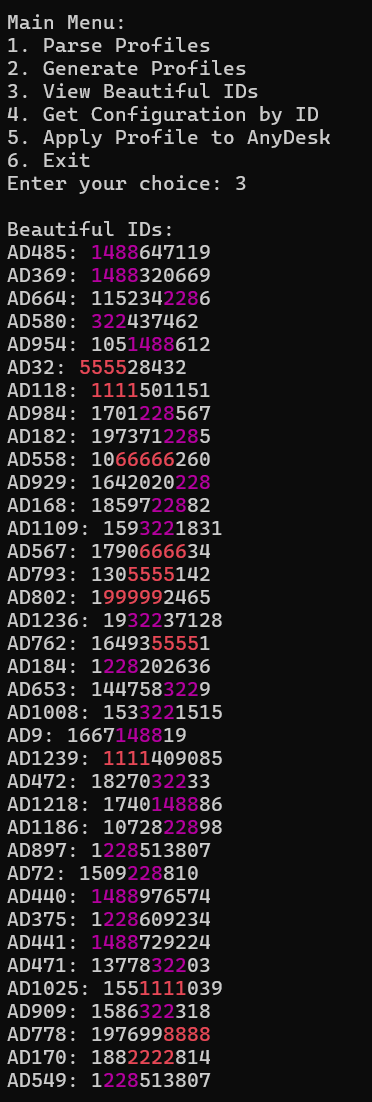
- Different colors for different types of "beautiful" IDs:
- Repeating digits: red.
- Ascending sequences: green.
- Descending sequences: yellow.
- Palindromes: blue.
- Special numbers: magenta.
- Different colors for different types of "beautiful" IDs:
Installation
-
Python 3.6+:
- Make sure Python is installed on your computer. You can download it here.
-
Libraries:
-
Install the required library
psutilusing the following command:pip install psutil
-
-
AnyDesk:
- The script uses the
AnyDesk.exeexecutable file. Ensure it is located in the same folder as the script or specify its path.
- The script uses the
Usage
-
Run the Program: Start the script in the terminal:
python main.py -
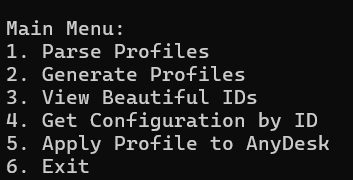
Main Menu : After launching, you will see the main menu:

Notes on Color Display
- Color Support
- The script uses ANSI escape codes for colored output.
- For correct color display, it is recommended to use Windows Terminal or any modern terminal emulator that supports ANSI colors.
- If you are using the default Windows Command Prompt (cmd.exe), colors may not display correctly due to limited ANSI support.
Examples
-
"Beautiful" IDs:

Project Structure
project/
│
├── main.py                # Main script
├── profiles/              # Folder for storing profiles
│   ├── AD1/
│   │   └── AnyDesk/
│   │       └── system.conf
│   ├── AD2/
│   │   └── AnyDesk/
│   │       └── system.conf
│   └── ...
└── README.md              # Documentation
License
This project is distributed under the MIT License. You can freely use, modify, and distribute this code.
Author
Author: urbnywrt
GitHub: urbnywrt